How to prepare files for printing
Use professional software
To achieve best results in printing we suggest using professional software: Adobe Illustrator, InDesign, Photoshop, QuarkXpress, Corel Draw. If you want to print only plain text, such as a book or brochure, you can use Microsoft Office Word.
File formats suitable for printing
To achieve best results in printing save your artwork as a Press Quality PDF file. You can also save your print-ready project in the following formats: EPS, TIF (flattened – NO layers), JPG.
We do not accept so-called open files: InDesign, Illustrator, MS Word, MS Excel, Publisher, Corel Draw, etc.
Image resolution for general printing
The general rule is: the higher the resolution, the better accuracy/more details on the printout (however this also means a bigger file).
In most cases we suggest setting the resolution between 300 and 600dpi for printing image-rich publications and fine art.
If your project contains small fonts (below 8pt) and you saved it as a bitmap (JPG, TIF, PSD etc.) we suggest setting the resolution between 400 and 600dpi.
The recommended best file format is PDF. Saving your project in this format keeps text separate from pictures. This means that even if your project contains low-resolutions images, the text will still be clear and sharp. Additionally, the saved file is smaller so you are able to send it over the internet faster.
Image resolution
in large format printing
Usually large posters, banners and display graphics are viewed from a distance. Therefore high resolution is not always necessary which allows the file size to reduce dramatically.
For outdoor banners wider than 3 meters, a resolution of 60dpi is often sufficient. For huge printed posters - over 10 meters in diameter it is acceptable to use as low as 30dpi resolution. If you are not sure how to prepare your file, contact us and we will advise you how to choose proper resolution for your printing project.
File delivery
Our Online Printing Shop gives you the option to upload design files once the order has been placed.
For all orders placed outside the Online Printing Shop you may use the following options:
Small files (up to 10MB) can be sent to our e-mail address: info(at)ceprint.co.uk.
To send a big file we suggest using one of the internet file-transfer services such as WeTransfer.com, YouSendIt.com or DropBox. You can also save your artwork on a memory stick and deliver it to our office.
Bleed
The most common problem we experience with artwork created by our customers is missing bleed. If your project contains a background other than white this means you need to add bleed.
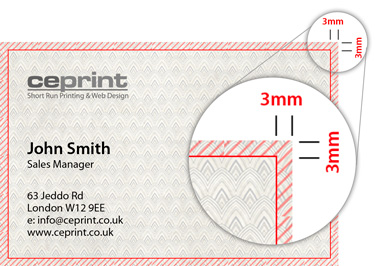
Bleed is an extension of the background which after printing will be cut off. Without bleed it is very likely that you would get a white border on printed materials e.g. business cards or leaflets.
Because of that, always make sure to enlarge your background 2 or 3mm on each side of your artwork, as you can see here:
Colours
To reproduce an image on paper printing press uses basic inks: cyan, magenta, yellow and black. We suggest setting your working colour space to CMYK (all professional software give this option). Thanks to that, what you see on your computer screen is closer to what you will get on paper.
In our printing house we are able to print directly from CMYK as well as RGB colour spaces.
Popular paper sizes
| Format | Size |
|---|---|
| A0 | 841mm x 1189mm |
| A1 | 594mm x 841mm |
| A2 | 420mm x 594mm |
| A3 | 297mm x 420mm |
| A4 | 210mm x 297mm |
| A5 | 148mm x 210mm |
| A6 | 105mm x 148mm |
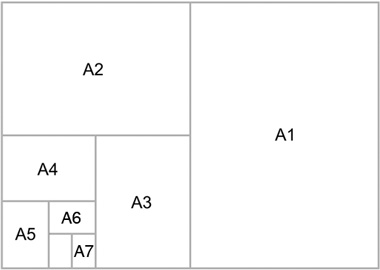
| A7 | 74mm x 105mm |